


Environments
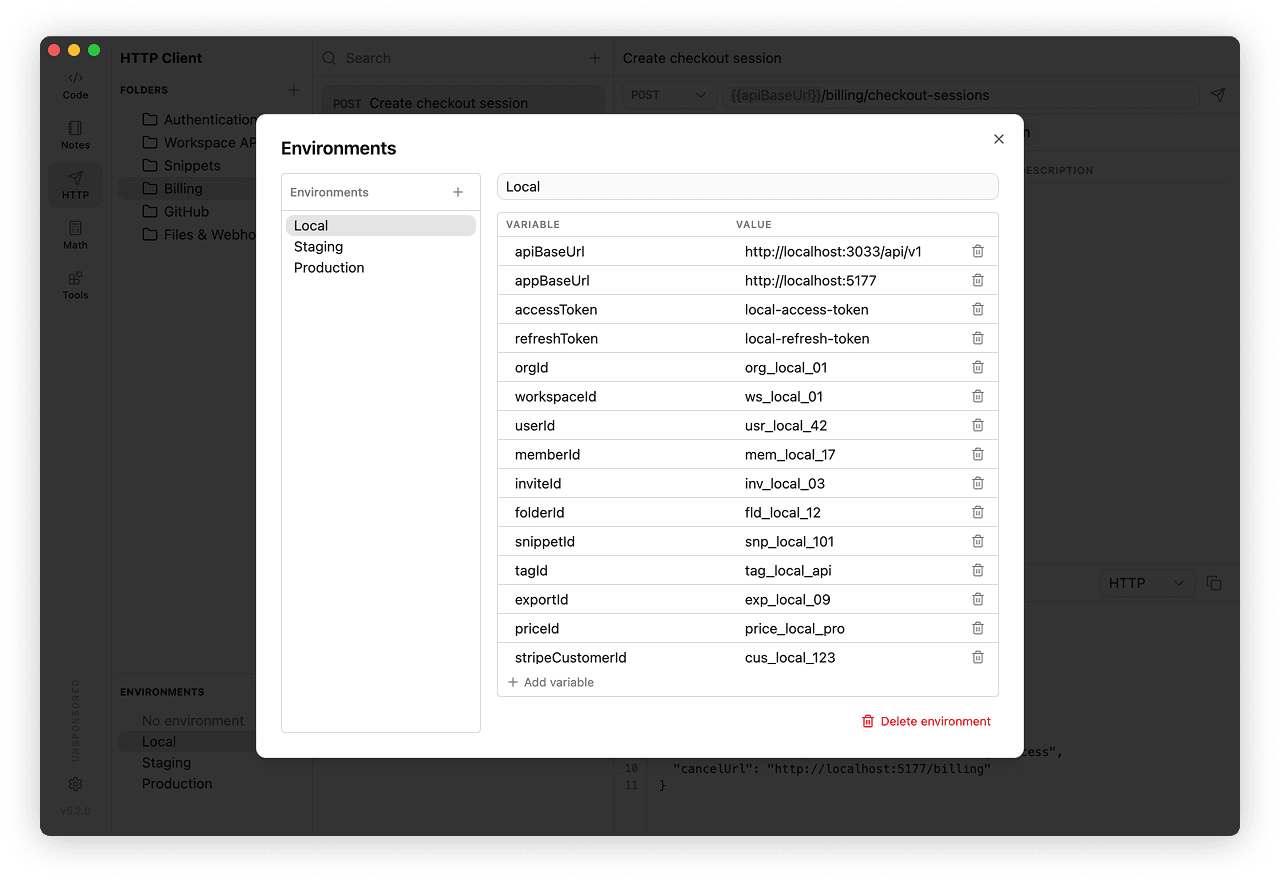
Environments store reusable variables for requests. Use them for values that change between local, staging, and production APIs, such as base URLs, user IDs, and organization IDs.
Plain text variables
Regular environment variables are stored as plain text in your Markdown Vault, so they travel with it when the vault is synced, shared, or committed to Git. For passwords, API tokens, private keys, and similar values use secret variables instead.
Create your first environment
Click the sliders icon beside Environments (the Manage tooltip), create an environment named Practice, and add baseUrl with the value https://postman-echo.com. Select Practice as active, then use {{baseUrl}}/get in a request. Regular environment edits are autosaved; you do not need to save a request to apply them. Create another environment when the same requests need a different server or credentials.
Variables
Use variables with double braces:
{{apiUrl}}/v1/users/{{userId}}/sessionsThe URL field keeps variables visible while you edit. Preview and request execution resolve collection, folder, environment, and Session variables. Previews mask secret and Session values; execution substitutes their real values.
Variables can be used in:
- URL
- params
- headers
- body
- auth fields
Secret Variables
Secret variables keep sensitive values out of the vault. The value is encrypted with your operating system keychain and stored locally, outside the Markdown Vault.
To create one, click the sliders icon beside Environments to open Manage, then click Add variable. Enter its name while leaving the value empty, then select the Secret checkbox. Wait for the protected value field to appear before entering the secret. Its value is saved when you leave that field.
You can also protect a variable that already exists: select the Secret checkbox next to it. massCode encrypts the current value and removes it from the vault.
Rotate values you protect later
Existing values are autosaved as plain text and may already be in synced copies or Git history. Protecting a variable does not remove those copies. Rotate credentials that were previously stored as regular variables.
Secrets are used like any other variable, with the same {{name}} syntax. When a request runs, massCode substitutes the real value, but the request history stores only a mask.
Working with existing secrets:
- Click the eye icon to show the stored value.
- Clear the Secret checkbox to stop protecting a variable. Its value is moved back into the environment as a regular plain text variable.
- To rename a secret, delete it and add it again.
Secrets are not synced
Only the secret name is stored in the vault. Its saved value is not synced with the vault, so on other devices the same secret shows Not set on this device and resolves to an empty value until you enter it there.
On Linux, encryption depends on a supported system keyring. If one is not available, secret storage is disabled and the Secret option is unavailable.
Secrets across vaults and devices
Secret values are stored locally for each vault and environment:
- Moving the vault in Settings → Storage carries secret values along with it.
- Switching to a different existing vault does not pick up values entered for the previous one, because it is another vault.
- Deleting an environment also deletes its local secret values.
The secret value editor shows the stored value only when you click the eye icon. Live network diagnostics and script logs can nevertheless contain real values; see Debugging. The request preview, the cURL command you copy from it, and the request history (both the URL and the error text) show a mask. During execution, the real value is used in the outgoing network request and is also available to trusted scripts.
If a value cannot be decrypted, for example because the file was written by a different operating system user or the keychain has changed, the secret is treated as not set: it shows Not set on this device and resolves to an empty value. The request still runs.
Variable precedence
For the same name, the effective order from lowest to highest priority is:
- Collection variables.
- Nested folder variables, with the closest folder winning.
- The active environment, including secret variables.
- Manual Session variables, including extraction and script writes.
For example, a collection can define a default baseUrl, a Staging environment can replace it, and a pre-request script can override an itemId temporarily. Environment and Session overrides do not change the saved collection default. Disabled collection/folder variables do not participate.
Scripts can read the merged value with mc.variables.get(), the selected environment specifically with mc.environment.get(), or the effective collection/folder defaults with mc.collectionVariables.get(). Only mc.variables.set/unset() writes temporary values; these calls do not edit the saved environment.
Active Environment
Use the Environments panel below folders to choose the active environment.
Select No environment to stop applying environment variables. Collection/folder variables still apply, and Session variables can still be extracted and used while no environment is selected. Placeholders without a matching variable remain unresolved.
Session Variables and Inspector
Open the Variables inspector using the right-panel icon in the editor header. It shows the relevant Collection, Environment, and Session scopes, masks secret and Session values, and identifies used values, overridden entries, and unresolved references. Use it to find which scope is supplying a placeholder before changing a saved value. Search by variable name, expand All variables for unused entries, or edit a regular environment value directly in the inspector. Collection values edited there remain collection drafts and require Save; environment edits are autosaved. A Session value takes priority even when the matching environment variable is a secret.
Create Session values through Variables → Post-response or with mc.variables.set() in a script. See Tests & Variables for a login example and extraction behavior.
Use {{name}} in subsequent requests. Session values are reusable, not consumed by the next request: they remain available until replaced by another extraction or cleared. Overriding a variable does not change its saved environment value. If the Session value is removed, requests use the matching environment or collection/folder value. The placeholder remains unresolved only when no scope supplies it.
Session values live only in memory. Clear session, switching environments (including No environment), switching vaults, or quitting or restarting the app clears them. Returning to a previous environment does not restore its Session values. Regular environment edits are autosaved; Session values are not written into the environment or vault.
The Folder runner uses its own temporary variables over the selected environment. It neither reads nor changes these manual Session values.
Managing Environments
Open Manage beside Environments to create, rename, or delete environments and edit their variables. Select an environment to edit its name or use Delete environment.