


Internal Links
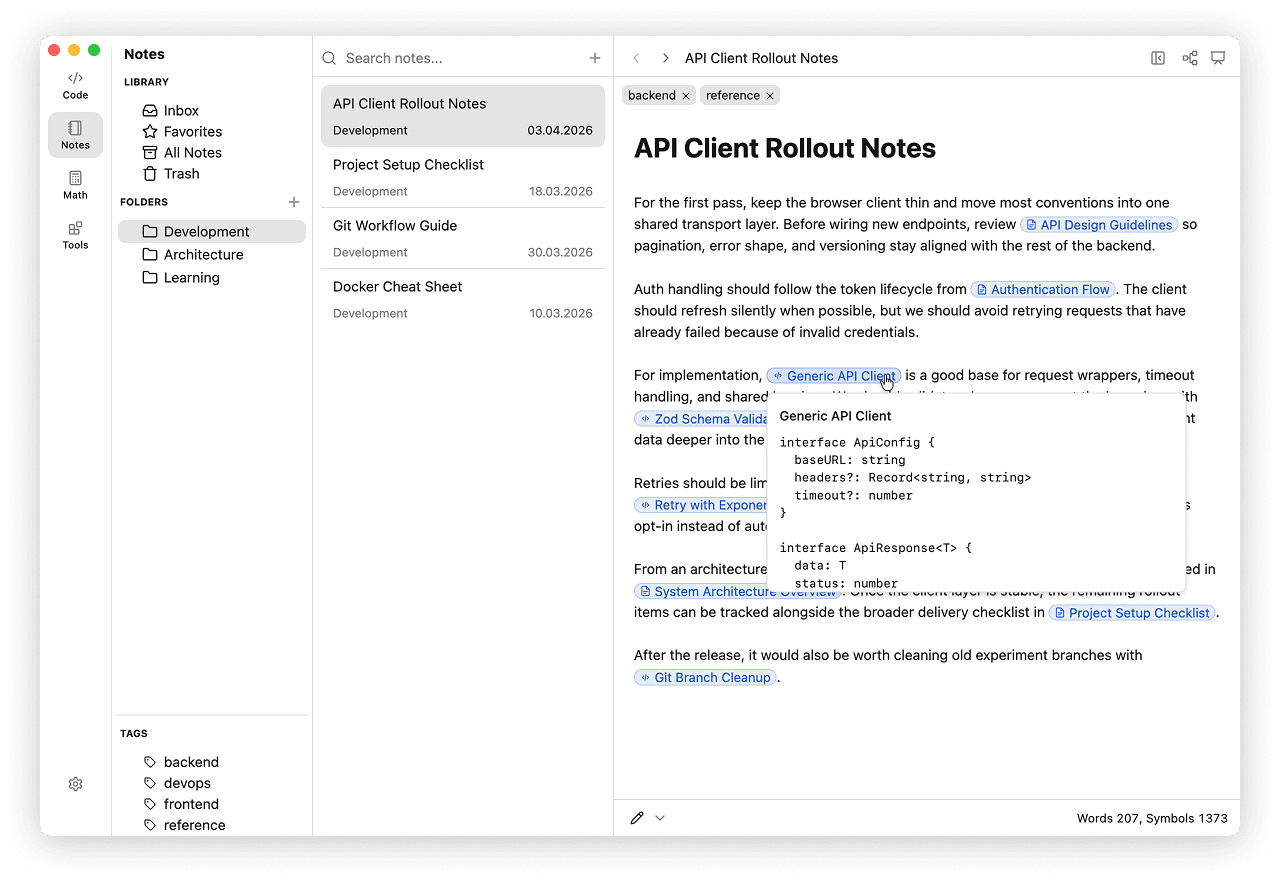
Internal Links let you connect notes, snippets, and HTTP requests with wiki-style links directly inside Notes. Use them to build lightweight documentation, link reference snippets or saved API requests from prose, and move through related item without leaving massCode.
Link Syntax
Use double brackets around the target name:
[[API authentication]]
[[Fetch helper]]
You can also provide custom visible text with an alias:
[[API authentication|auth flow]]
[[Fetch helper|request snippet]]
massCode resolves internal links by item name. A target can be a note, a snippet, or an HTTP request.
If two notes share the same name, qualify the link with a folder path:
[[Folder/Note]]
[[Parent/Child/Note]]
Creating Links
Start typing [[ in the Notes editor to open the internal links picker.
- The picker searches notes, snippets, and HTTP requests.
- Results show the item name and its current location.
- Press Enter to insert the active result.
- Use the arrow keys to move through the list.
The picker inserts the shortest unambiguous form: just the name when it is unique, or a folder path when another item shares the same name.
Plan Notes, Snippets, and Requests
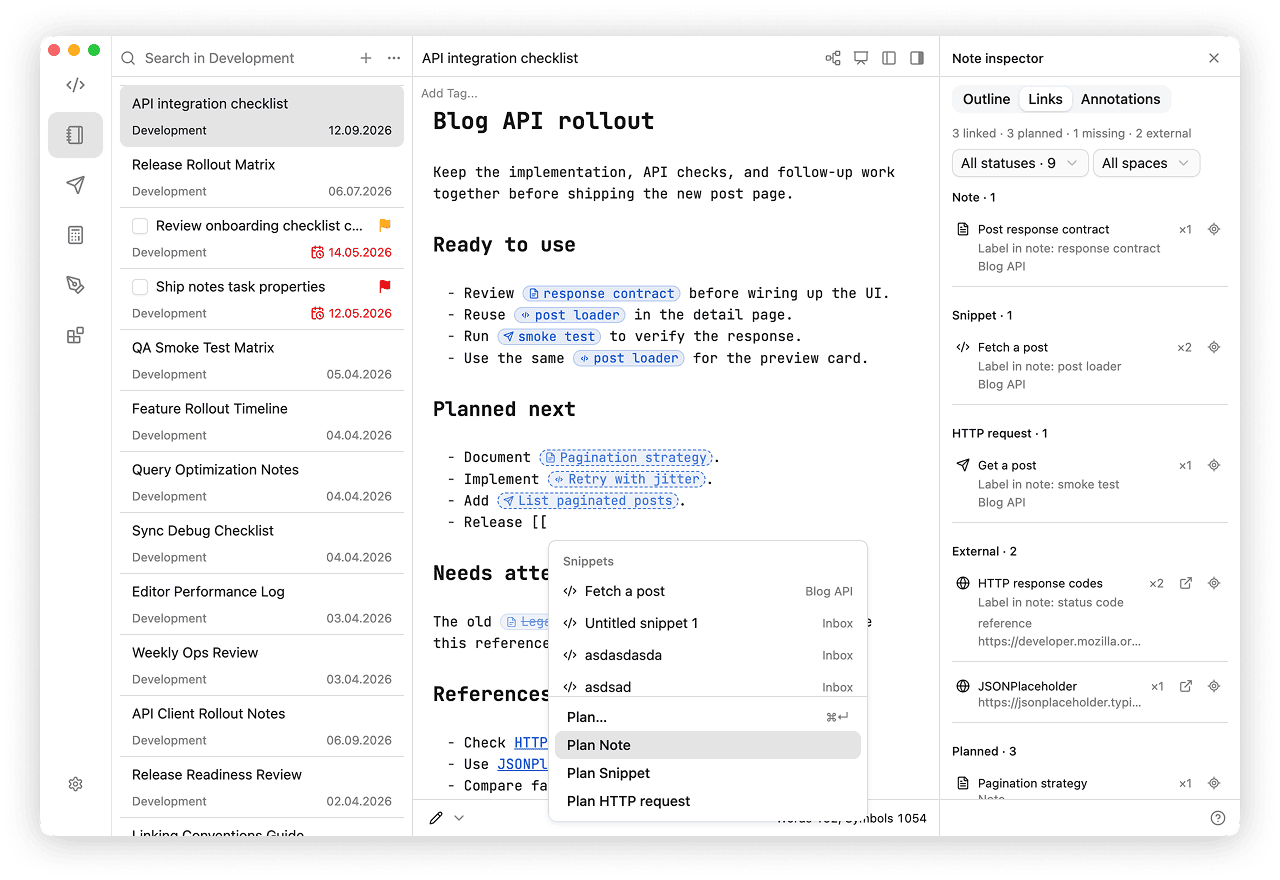
Plan a note, snippet, or HTTP request right where you need it in your writing. Insert a placeholder, continue the note, and create the item later without losing your place.
Insert a placeholder
- Type
[[followed by the title you have in mind. - Choose Plan Note, Plan Snippet, or Plan HTTP request with the arrow keys and Enter, or click the action.
- Continue writing. The placeholder has a dashed border in Live Preview; the actual item does not exist yet.
The Plan… action stays pinned below the search results. To reach it without stepping through matching items, press Cmd+Enter on macOS or Ctrl+Enter on Windows/Linux. This selects Plan Note; press Enter to insert it, or use the arrow keys to choose another type. Tab keeps its usual indentation behavior.
Create the planned item
Hold Cmd on macOS or Ctrl on Windows/Linux and click the placeholder. massCode creates the item, replaces the placeholder with its link, and opens the usual Notes, Code, or HTTP space with the title selected for renaming.
Fill in the item normally, then use Back to return to your note through the existing navigation history. The placeholder is now a regular link to the created item.
Notes and snippets are created in Inbox. HTTP requests are created in the Inbox collection, which is created on demand. Names are checked when you activate the placeholder: if the name is taken, a numeric suffix is added, such as Example 1 or Example 2.
Find all placeholders in Note inspector → Links by choosing the Planned status filter.
Markdown syntax
Placeholders are stored as Markdown:
[[masscode:planned:note|Authentication guide]]
[[masscode:planned:snippet|Token refresh helper]]
[[masscode:planned:http-request|Refresh access token]]
Only the clicked placeholder is replaced. A planned item has no backlinks or export link until it is created. Repeated clicks while creation is in progress do not create another object. If a step fails, an error notification offers a retry when it is safe to continue.
Reserved link targets
The three exact targets above are reserved for placeholders. Existing links using them change meaning; your notes are not rewritten automatically. To link to an imported or older item with one of these names, select it in the picker, which writes an explicit ID link.
Opening Links
Hold Cmd on macOS or Ctrl on Windows or Linux, then click the link.
- If the target is a note, massCode opens it in Notes.
- If the target is a snippet, massCode switches to Code and opens the snippet there.
- If the target is an HTTP request, massCode switches to HTTP and opens the request there.
Broken links stay visible, but they appear dimmed and struck through so you can spot missing targets.
Preview
Hover an internal link while holding Cmd on macOS or Ctrl on Windows or Linux to open a preview popup.
- Note links show a text excerpt.
- Snippet links show the first snippet fragment.
- HTTP request links show the method, URL, and description.
This helps you confirm the target before you navigate away from the current note.
Note Inspector
Open the Links tab in Note inspector to inspect linked items, planned placeholders, missing targets, and external addresses. Filter by status or space and use the locate button to find each occurrence in your note.
Navigation History
massCode keeps a shared navigation history for Notes, Code, and HTTP during your session. Opening an item from a list, search, Command Palette, Recent, or an internal link adds a navigation step.
- Use the back and forward buttons in the editor header to revisit items across spaces.
- Use Cmd+[ / Cmd+] on macOS or Ctrl+[ / Ctrl+] on Windows or Linux.
- The same actions are also available from the History menu.
Returning to a note restores its scroll position.
Opening a different item after going back replaces the remaining forward history. Selecting the current item again preserves it. Deleted items are skipped.
History resets when the app reloads. Recent is a separate list of recently opened items.
When to Use Internal Links
- Link architecture notes to implementation snippets
- Link API docs to saved HTTP requests
- Connect meeting notes to reference code
- Build personal knowledge-base pages that jump between notes, snippets, and requests
- Keep long-form docs in Notes while linking reusable code examples from Code and API checks from HTTP