


Requests
Requests are the main items in the HTTP space. Each request stores the method, URL, params, headers, body, auth settings, and a Markdown description. Choose GET, POST, PUT, PATCH, DELETE, HEAD, or OPTIONS. The same selector also offers the separate WebSocket workflow.
WARNING
HTTP requests are stored in your Markdown Vault as plain text. Do not save real passwords, API tokens, private keys, or other secrets in request auth, headers, params, or bodies if your vault is synced, shared, or committed to Git.
Creating Requests
Choose New request in the sidebar + menu or a collection/folder context menu. New requests are created in the selected folder, or without a folder when none applies. Give the request a descriptive name such as List products; naming it saves the name independently of its content. For shared API setup, start with a collection.
Request context menus include actions for:
- duplicate
- delete
- copy request preview
- copy internal link
- reveal in file manager
Request Editor
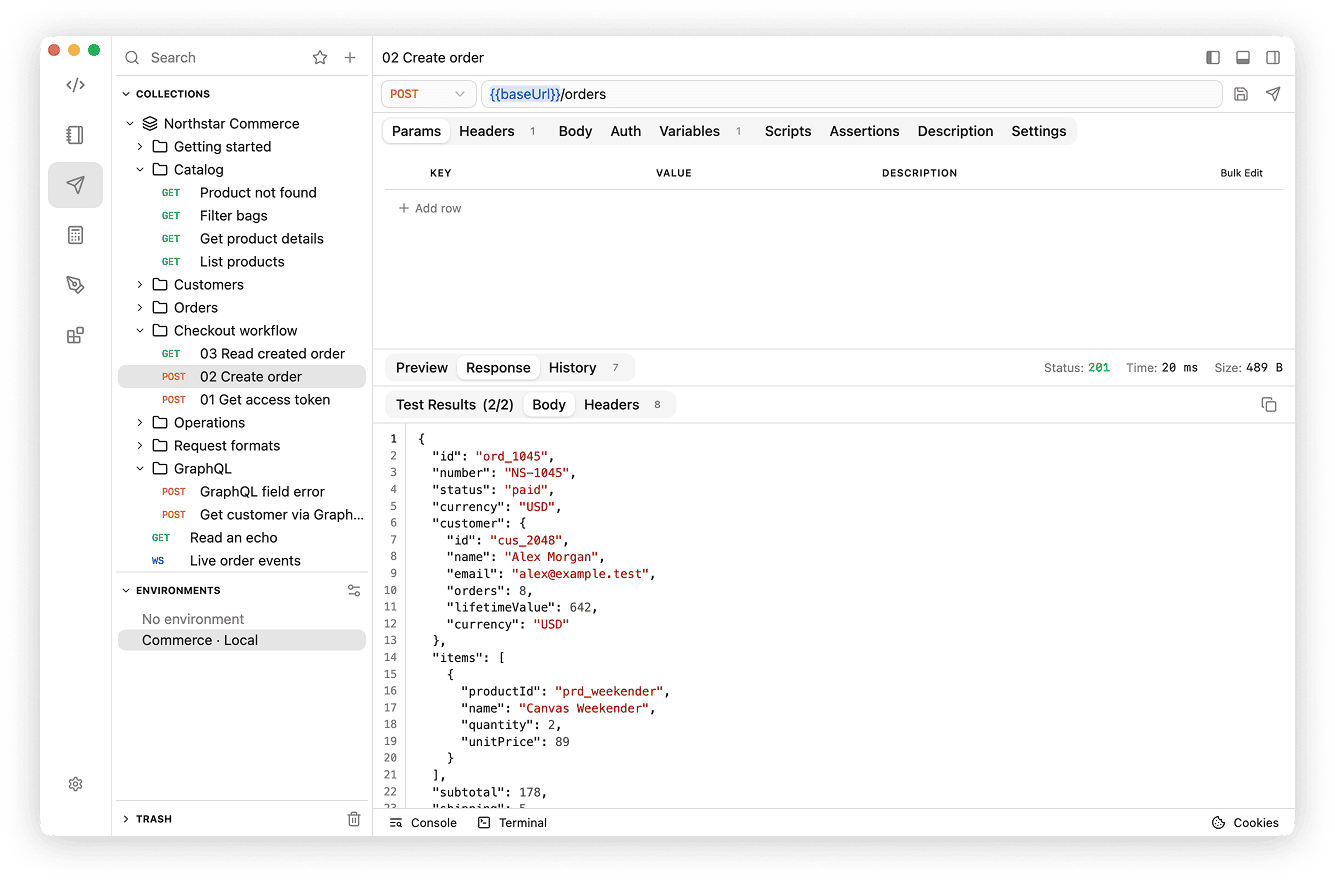
The request editor is split into focused tabs:
- Params - query parameters sent with the URL
- Headers - request headers
- Body - None, JSON, Text, Form URL Encoded, Multipart Form Data, Binary, or GraphQL
- Auth - None, Inherit from parent, Bearer Token, Basic Auth, or API Key. See Authorization for fields and precedence. Auth values are stored in the vault as plain text, so keep tokens and passwords in secret variables and reference them here.
- Scripts - run trusted pre-request scripts and JavaScript tests
- Description - markdown notes for the request
- Settings - override HTTP transport defaults and cookie-jar use. See HTTP Settings.
- Variables - extract response values into temporary session variables under Post-response
- Assertions - define declarative checks for the request
Drafts and Explicit Saving
Use the Save icon next to Send or ⌘+S on macOS / Ctrl+S on Windows and Linux to save request fields, scripts, assertions, and variable extraction. Request content is not autosaved. The request name is saved automatically and independently; renaming does not save or discard content edits. A green dot on Save indicates unsaved edits; saving invalid rules opens the tab containing the first error. Before switching requests or leaving the HTTP space, choose Save, Discard changes, or Cancel. If saving fails partway through, remaining unsaved edits stay in the editor for retry.
Send uses the current request fields, trusted scripts, assertions, and variable extraction without saving them. Invalid rules are highlighted before sending; unsaved changes remain in the editor after execution.
Params and Headers
Enter query parameters directly in the URL or in Params; the editor synchronizes the two. Use the row checkbox to keep a parameter/header saved while excluding it from sending. Descriptions explain why a row exists and are not transmitted. Duplicate query names are supported, for APIs such as ?tag=travel&tag=weekend.
Headers are case-insensitive by name. Enabled parent headers apply unless overridden closer to the request. Repeated headers in one scope are combined in order; see Inheritance. Prefer Auth for common authentication schemes and let the client generate payload headers where appropriate.
Bulk edit
Use Bulk edit in supported key-value tables to paste one key:value pair per line. Prefix a line with // to disable it. The first colon separates the key from the value, so values may contain additional colons. Switching back preserves descriptions for matching existing rows; descriptions are edited in the table, not in bulk text.
Accept:application/json
X-Client:api-practice
//X-Debug:true
Body
Select the payload format in Body. The editor keeps payload content in the request draft until you save.
| Body mode | How to use it |
|---|---|
| None | Send no payload. This is a usual starting point for GET and HEAD. |
| JSON | Enter JSON in the code editor; use the API's expected object/array shape. |
| Text | Enter raw text, XML, or another text format, and set the appropriate Content-Type header. |
| Form URL Encoded | Add enabled key-value rows. Values are encoded as form fields; repeated keys are supported. |
| Multipart Form Data | Add text or file rows, with names, descriptions, and enabled state. Choose each upload from your device. Let the client generate the multipart Content-Type boundary. |
| Binary | Choose a local file to send as the entire payload, for APIs that expect raw bytes. |
| GraphQL | Enter a query/mutation, JSON variables, and operation selection. See GraphQL. |
File selections reference files on this device; saving or syncing the request does not bundle the uploaded file into the vault. Reselect a file if its path is unavailable after moving machines or importing a collection. Generating a preview does not read local file contents.
For a simple public echo exercise, send POST to https://postman-echo.com/post, choose JSON, and enter the sample below. Inspect the echoed response body; never put private data into this public endpoint.
{ "message": "hello", "quantity": 2 }Sending Requests
Send the selected request with one of these methods:
- Click the send button next to the URL field.
- Select Editor → Send Request from the menu bar.
- Press ⌘+Enter on macOS or Ctrl+Enter on Windows or Linux.
The request cookie toggle applies immediately, independently of Save. It controls the automatic cookie jar; see Cookies. Use request Settings for transport overrides.
Preview
The lower panel can show the outgoing request before it is sent.
- HTTP preview shows the request line, host, headers, and body.
- cURL preview builds a command you can paste into a terminal.
- Code previews offer 29 generators across 20 language and runtime targets, using the current draft, including unsaved edits.
Use the copy button in the preview panel to copy the active preview.
Code Generation
Select a language in the preview toolbar. If it has multiple clients, choose one using the tabs above the code. For example, Node.js offers Native, Axios, and Fetch, while Shell offers cURL, HTTPie, and Wget.
| Language or runtime | Available generators |
|---|---|
| Shell | cURL, HTTPie, Wget |
| C | libcurl |
| Clojure | clj-http |
| Crystal | HTTP::Client |
| C# | HttpClient, RestSharp |
| Go | net/http (NewRequest) |
| HTTP | Raw HTTP/1.1 |
| Java | java.net.http, OkHttp |
| JavaScript (browser) | Fetch, Axios |
| Kotlin | OkHttp |
| Node.js | Native (node:http / node:https), Axios, built-in Fetch |
| Objective-C | NSURLSession |
| OCaml | CoHTTP |
| PHP | cURL, Guzzle |
| PowerShell | Invoke-RestMethod |
| Python | Requests, http.client |
| R | httr |
| Ruby | Net::HTTP |
| Rust | reqwest |
| Swift | URLSession |
Variables and Runtime Requirements
Enable Interpolate variables to resolve collection, folder, and regular environment variables. Secret and Session values are masked, and unresolved variables remain as placeholders. Disable the option to keep variable placeholders in the snippet. Copied snippets contain the same placeholders or masks, so supply real values in your own execution environment.
Node.js snippets use ES modules and modern built-in web APIs; use Node.js 20 or later. Its Native and Fetch generators use built-in APIs. Axios snippets require the axios package, and Python Requests snippets require requests. Swift snippets use URLSession with async/await. Install the corresponding library when choosing another third-party client from the table.
Previews do not run scripts, and generated snippets do not include pre-request or post-response scripts, assertions, or extraction rules. Variables created by scripts may remain unresolved or appear as Session masks. Add any required variable preparation and response checks to your own code.
For multipart uploads, browser JavaScript snippets accept File or Blob arguments in field order instead of copying local file paths. Node.js, Python Requests, and Swift snippets include file paths to read when you run the generated code; creating a preview does not read the files. Clients that cannot represent a file upload show an explanation. The multipart boundary is generated by the client, so a manually entered Content-Type is omitted. Browser and Node.js Fetch cannot send a body with GET or HEAD; the preview warns you to change the method or remove the body.
Tests and Variables
Use Assertions to check responses and Variables → Post-response to extract values for subsequent requests. See Tests & Variables for setup, supported operators, and results. For pre-request code and JavaScript tests, see JavaScript Scripts.
Response Viewer
Read status, time, size, body, headers, and test results after sending. Open request history to inspect previous retained sends. Responses & History explains truncation, snapshots, retention, and redaction; Debugging covers actual network traffic and script logs.
For GraphQL queries and mutations with JSON variables and operation selection, see GraphQL.