


Home / Compare / Best Code Snippet Managers
Best Code Snippet Managers
A code snippet manager is where the small, reusable pieces of your work live: the regex you always forget, the boilerplate config, the shell one-liner, the query you wrote once and will need again. The right one saves those snippets in seconds and gives them back the moment you need them. The wrong one becomes another place you forget to look.
This guide compares snippet tools and adjacent developer workflows. “Best” depends on whether you need an organized code library, publishing, text expansion, or AI recall; this is not a performance ranking.
How we evaluated them
This is a documentation-based comparison by the massCode project. We reviewed the linked product documentation and massCode implementation; we did not benchmark competing apps or perform a hands-on test of every product. The criteria are:
- Storage and ownership. Are your snippets plain files on your disk, or rows in someone else's database? Can you read them without the app?
- License. Open source you can audit and fork, or proprietary.
- Platforms. macOS only, or also Windows and Linux.
- Price. Free, one-time purchase, or subscription.
- Account requirement. Does it work offline without signing in?
- Search. Full-text search is the feature you use most and notice least.
- Imports. Can it pull in your existing library, or do you start from scratch?
- Scope. Snippets only, or notes, HTTP requests, and other developer tools alongside them.
At a glance
| Tool | License | Platforms | Storage | Account | Scope |
|---|---|---|---|---|---|
| massCode | Open source (AGPL v3) | macOS, Windows, Linux | Local Markdown files | No | Snippets + notes, HTTP, math, drawings, tools |
| SnippetsLab | Proprietary | macOS only | Local library | No | Snippets |
| Pieces | Proprietary | See current desktop downloads | On-device memories | Subscription | AI work-context memory |
| Cacher | Proprietary | macOS, Windows, Linux | Cloud | Yes | Snippets, team libraries |
| Lepton | Open source (MIT) | macOS, Windows, Linux | GitHub Gist | GitHub | Snippets, GitHub Gist client |
| GitHub Gist | Proprietary (service) | Web + API | Cloud | Yes | Snippets |
| Raycast Snippets | Proprietary | macOS, Windows; iOS access | App database | Optional | Text expansion |
| VS Code snippets | Open source (editor) | Anywhere VS Code runs | JSON in editor config | No | Snippets in-editor |
Details and trade-offs for each are below. Prices and limits refer to the linked web offers reviewed September 6, 2026; check regional and app-store terms before buying.
Cost and moving a library
| Tool | Free use / paid option | Getting data in or out |
|---|---|---|
| massCode | Free | VS Code, Raycast, SnippetsLab JSON, public Gist URLs; Markdown vault readable outside the app |
| SnippetsLab | Free | JSON export can be imported into massCode |
| Pieces | Paid plans with a trial | Check version-specific exports; no direct massCode importer |
| Cacher | 15 private snippets and 3 private labels free; paid plans expand limits | Gist sync and export; no direct massCode importer |
| Lepton | MIT-licensed app | Gist-based workflow; preserve GitHub access and backups |
| GitHub Gist | Free hosted gists | Git clone; massCode imports already-public URLs |
| Raycast Snippets | Free core feature; paid sync options | JSON import/export, readable by massCode |
| VS Code snippets | Built into the editor | JSON snippet files, readable by massCode |
Retrieval and offline work
| Workflow | What to compare |
|---|---|
| Search a curated library | massCode provides scoped list search in Code and Notes; its Command Palette searches titles across spaces. SnippetsLab, Cacher, and Lepton offer their own library workflows; test the fields you rely on. |
| Expand text while typing | Raycast and VS Code snippets target insertion. VS Code uses editor prefixes; Raycast offers desktop keyword expansion. |
| Recall past context | Pieces provides AI-assisted work-context recall rather than the same retrieval model as a curated library. |
| Publish and retrieve gists | GitHub offers web search and Git clones. Local clones can be searched with your editor; they are not automatically an organized desktop library. |
| Work without a network | massCode uses local files; keep synced files downloaded. A Git clone is local too. For account-based products, check login, caching, and AI-provider requirements in the workflow you intend to use. |
For a reproducible evaluation, use the sample workflow. These are documented distinctions, not measured search-speed results.
The best code snippet managers
massCode
massCode is a free, open-source, local-first developer workspace. Snippets sit alongside notes, HTTP requests, math sheets, drawings, and dev tools, and everything is stored as plain Markdown files in a Markdown Vault on your own disk.
- License: AGPL v3, source on GitHub
- Platforms: macOS, Windows, Linux
- Storage: Local
.mdfiles you can read, edit, and back up without the app - Account: None required
- Search: Full-text across snippets and notes (HTTP requests by name and URL)
- Imports: VS Code snippets JSON, Raycast snippets JSON, SnippetsLab JSON, public GitHub Gist URLs, and Obsidian markdown folders
- Sync: Bring your own — iCloud, Dropbox, Google Drive, Syncthing, or Git
Best for: developers who want their snippets to stay as plain files they own, on every platform, for free, and who appreciate having notes, HTTP requests, math, and drawings in the same window. Download massCode to try it.
A concrete massCode library workflow
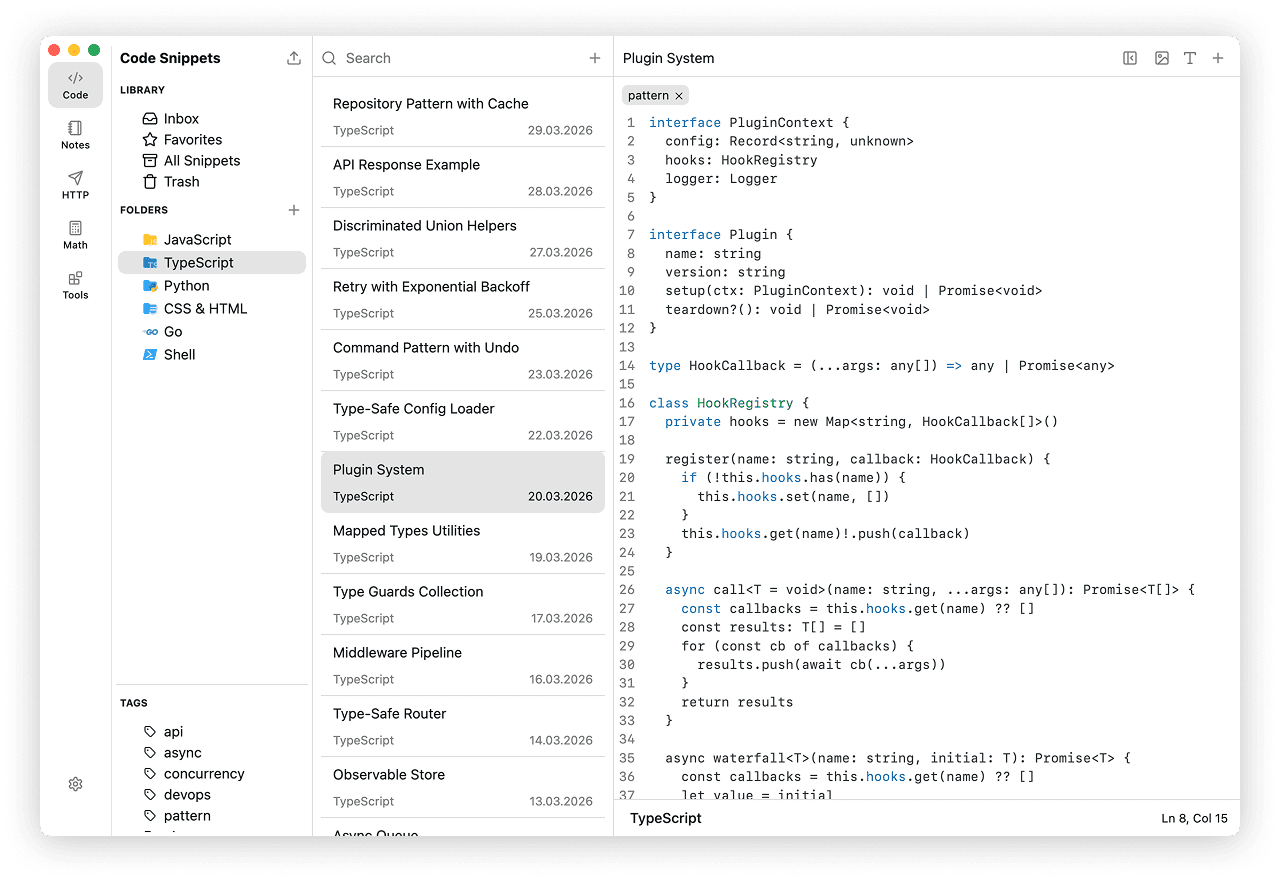
The existing Code documentation illustrates the library layout: folders on the left, a snippet list in the middle, and code in the editor. This is a product screenshot, not a comparative benchmark.
Import behavior matters more than a simple “supports import” checkbox:
- A VS Code snippet body is preserved as text. Its prefix becomes a tag in massCode; it does not become an editor expansion trigger. A multi-line body becomes one code fragment.
- A Raycast snippet becomes a plain-text fragment. Keywords do not enable system-wide expansion in massCode, and dynamic placeholders are not evaluated during import.
- A public Gist with several complete text files becomes one snippet with multiple fragments. Truncated or missing file contents are skipped with preview warnings.
These examples follow the current VS Code, Raycast, and Gist import implementation. They describe massCode conversion behavior, not tests of competing applications. See Code imports for the user workflow.
SnippetsLab
SnippetsLab is a long-standing, polished, macOS-native snippet manager. It has a refined interface, a built-in assistant for the macOS menu bar, and deep integration with the Apple ecosystem. As of 2026 its own site states it is "FREE for everyone — no ads, no in-app purchases, and no subscriptions."
- License: Proprietary
- Platforms: macOS only (macOS 13.5 or later)
- Price: Free
- Storage: Local library
- Scope: Snippets, focused and well executed
Best for: developers who live entirely on macOS and want a native, carefully designed snippet app at no cost. If you also use Windows or Linux, it cannot follow you there. See the full massCode vs SnippetsLab comparison.
Pieces
Pieces now emphasizes on-device work memory and AI recall across applications. It belongs in this guide as an adjacent workflow for people who want to retrieve past context rather than manually curate every code example.
- License: Proprietary
- Storage: Work memories saved on-device
- Price: Paid subscription with a trial; see current plans
- Scope: AI memory, summaries, and context retrieval
Best for: finding context from previous work with AI. For a manually organized code library, compare a dedicated snippet manager. Older saved-snippet/export workflows should be checked against the installed version before migration. See massCode vs Pieces.
Cacher
Cacher is a cloud-based snippet organizer aimed at individuals and teams, with shared libraries, labels, and editor integrations.
- License: Proprietary
- Platforms: macOS, Windows, Linux, plus a VS Code extension
- Storage: Cloud
- Scope: Personal and team snippet libraries
Best for: teams that want a hosted, shared snippet library with centralized access. If you prefer your snippets on local disk with no account, it is the opposite model. See massCode vs Cacher.
Lepton
Lepton is a lean, open-source snippet manager powered by GitHub Gist. Your snippets are stored as Gists, so they round-trip with GitHub, including GitHub Enterprise.
- License: Open source (MIT)
- Platforms: macOS, Windows, Linux
- Storage: GitHub Gist-backed library
- Scope: Snippets only
- Release status: Lepton 2.0.0 was released in July 2026. A release date alone does not establish support quality.
Best for: developers who want their snippet library to be their GitHub Gists. Compare its current platform builds and export workflow before moving a library.
GitHub Gist
GitHub Gist is not a dedicated app, but plenty of developers use it as one. It is free, instantly shareable, and versioned with Git.
- License: Proprietary service
- Platforms: Web and API, plus many third-party clients
- Storage: Cloud (your GitHub account)
- Scope: Snippets as Gists
Best for: quick, shareable, public or secret snippets you already manage on GitHub. As a primary library it lacks folders, rich organization, and offline-first storage. If you outgrow it, massCode can import your Gists by URL — see massCode vs GitHub Gist.
Raycast Snippets
Raycast Snippets is a feature of the Raycast launcher for macOS and Windows. It is best as a global text expander you trigger from anywhere, rather than a long-form code library.
- License: Proprietary
- Platforms: macOS, Windows; iOS access
- Storage: Raycast database, optional cloud sync on Pro
- Scope: Short text expansion
Best for: system-wide text expansion of short snippets. Many developers pair it with a dedicated library; massCode even ships a Raycast extension so you can search your massCode snippets from Raycast. See massCode vs Raycast Snippets.
VS Code snippets
VS Code has a built-in snippets feature: JSON files that expand by prefix as you type. It is free, already installed, and great for templated code you insert while writing.
- License: Open source editor
- Platforms: Anywhere VS Code runs
- Storage: JSON in your editor config
- Scope: In-editor expansion
Best for: templated boilerplate you insert by prefix inside VS Code. It is not a searchable library for snippets you collect and revisit. massCode imports VS Code snippets JSON, so the two can coexist.
How to choose the right snippet manager
Work through these questions before installing anything:
- Where should my snippets live? Plain files on your disk, a hosted cloud account, or GitHub Gists?
- Which platforms do I use? macOS only opens more options; cross-platform narrows the field to a few.
- Do I want it to work offline with no login? If yes, rule out account-required cloud tools.
- Will I import an existing library? Check that your current format (VS Code JSON, Gists, SnippetsLab export) is supported.
- Snippets only, or more? If your day also includes notes, HTTP requests, and quick math, a workspace beats a single-purpose app.
- Free, one-time, or subscription? Decide what you are willing to pay before you get attached.
Recommendations by use case
- You want plain files you own, on every platform, for free — and notes, HTTP, math, and drawings in the same app: choose massCode.
- You are macOS-only and want a polished native app: choose SnippetsLab.
- You want AI recall of past work context: choose Pieces.
- Your team needs a shared, hosted snippet library: choose Cacher.
- You want your library to be GitHub Gists: choose Lepton or GitHub Gist directly.
- You want system-wide text expansion: choose Raycast Snippets.
- You only insert templated code inside VS Code: the built-in VS Code snippets are enough.
Frequently asked questions
What is a code snippet manager?
A code snippet manager is an app for saving, organizing, and quickly retrieving reusable pieces of code and text — regexes, config blocks, commands, queries, and boilerplate. Good ones add folders or tags, full-text search, syntax highlighting, and imports so your existing snippets come along.
What is the best free code snippet manager?
For a free, cross-platform, open-source option, massCode stores every snippet as a plain Markdown file on your disk with no account required. Lepton (MIT) is also free but stores snippets as GitHub Gists. VS Code's built-in snippets are free for in-editor expansion.
What is the best open-source code snippet manager?
The main open-source options are massCode (AGPL v3, local Markdown files, cross-platform) and Lepton (MIT, GitHub Gist-backed). For a deeper look at licenses and trade-offs, see Best open-source snippet manager.
Where are my code snippets actually stored?
It depends on the tool. massCode stores them as plain .md files on your local disk. SnippetsLab keeps a local library. Cacher and GitHub Gist store them in the cloud. Lepton stores them as GitHub Gists. If reading your snippets without the app matters to you, prefer a tool with documented local file storage.
Can I move my snippets between snippet managers?
Often, yes. massCode imports VS Code snippets JSON, Raycast snippets JSON, SnippetsLab JSON, public GitHub Gist URLs, and Obsidian markdown folders, so migrating an existing library is usually a few clicks rather than a manual copy.
Try massCode
If your answers point to local files, cross-platform, no account, free, open-source, and more than just snippets, massCode is the closest match. Download massCode or browse the comparisons to see how it stacks up against the tool you use today.